API documentation for this tool
Documentation for PySpaceMouse is generated by MkDoxy.
Examples
More examples can be found in Examples page.
Module pyspacemouse
The module-level API is as follows:
open(callback=None, button_callback=None, button_callback_arr=None, set_nonblocking_loop=True, device=None)
    Open a 3D space navigator device. Makes this device the current active device, which enables the module-level read() and close()
    calls. For multiple devices, use the read() and close() calls on the returned object instead, and don't use the module-level calls.

    Parameters:
        callback: If callback is provided, it is called on each HID update with a copy of the current state namedtuple
        dof_callback: If dof_callback is provided, it is called only on DOF state changes with the argument (state).
        button_callback: If button_callback is provided, it is called on each button push, with the arguments (state_tuple, button_state)
        device: name of device to open, as a string like "SpaceNavigator". Must be one of the values in `supported_devices`.
                If `None`, chooses the first supported device found.
    Returns:
        Device object if the device was opened successfully
        None if the device could not be opened

read()              Return a namedtuple giving the current device state (t,x,y,z,roll,pitch,yaw,button)
close()             Close the connection to the current device, if it is open
list_devices()      Return a list of supported devices found, or an empty list if none found
open() returns a DeviceSpec object.
If you have multiple 3Dconnexion devices, you can use the object-oriented API to access them individually.
Each object has the following API, which functions exactly as the above API, but on a per-device basis:
dev.open()          Opens the connection (this is always called by the module-level open command,
                    so you should not need to use it unless you have called close())
dev.read()          Return the state of the device as namedtuple [t,x,y,z,roll,pitch,yaw,button]
dev.close()         Close this device
There are also attributes:
dev.connected       True if the device is connected, False otherwise
dev.state           Convenience property which returns the same value as read()
State Objects
State objects returned from read() have 7 attributes: [t,x,y,z,roll,pitch,yaw,button].
- t: timestamp in seconds since the script started.
- x,y,z: translations in the range [-1.0, 1.0]
- roll, pitch, yaw: rotations in the range [-1.0, 1.0].
- buttons: list of button states (0 or 1), in order specified in the device specifier
Axis Conventions
Built-in device specs can be opened with an explicit axis convention:
import pyspacemouse
from pyspacemouse import AxisConvention

with pyspacemouse.open(axis_convention=AxisConvention.HID_Z_UP) as device:
    state = device.read()
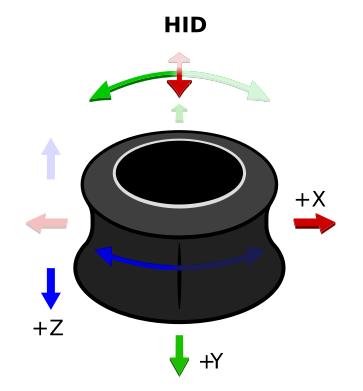
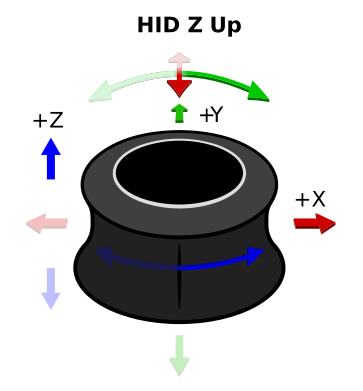
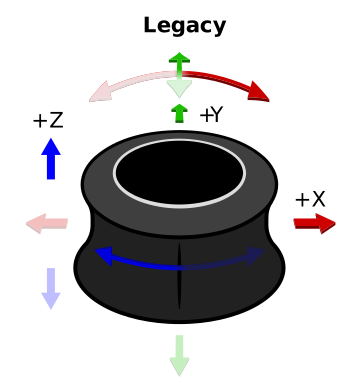
The same axis_convention argument is available on open_by_path() and
open_with_config().
| Convention | Translation axes | Rotation axes | Notes |
|---|---|---|---|
AxisConvention.HID |
+x right, +y toward the user, +z down |
right-handed | USB HID convention; see HID Usage Tables, 4.2 Axis Usages. |
AxisConvention.HID_Z_UP |
+x right, +y away from the user, +z up |
right-handed | HID frame, rotated -180 degrees about +X so Z points up |
AxisConvention.ROS |
+x forward, +y left, +z up |
right-handed | ROS REP 103 body frame. |
AxisConvention.UNITY |
+x right, +y up, +z forward |
left-handed | Unity world/object frame. |
AxisConvention.LEGACY |
x=+HID_x, y=-HID_y, z=-HID_z |
roll=-HID_Ry, pitch=-HID_Rx, yaw=+HID_Rz |
Deprecated. Default for backward compatibility. |
For new code, select a convention that matches your need. Use AxisConvention.LEGACY only for existing code that
depends on the old PySpaceMouse signs or labels.
Custom device_spec mappings are used exactly as provided. If you pass a
custom device_spec, do not also pass axis_convention; adjust the mapping
with create_device_info() or modify_device_info() instead.
Custom Device Configuration
You can customize axis mappings without modifying the TOML configuration by using the helper functions:
create_device_info()
Create a completely custom device configuration:
custom = pyspacemouse.create_device_info(
    name="MyDevice",
    vendor_id=0x256F,
    product_id=0xC635,
    mappings={
        "x": (1, 1, 2, 1),  # (channel, byte1, byte2, scale)
        "y": (1, 3, 4, -1),  # Inverted
        "z": (1, 5, 6, -1),
        "pitch": (2, 1, 2, -1),
        "roll": (2, 3, 4, -1),
        "yaw": (2, 5, 6, 1),
    },
    buttons={"LEFT": (3, 1, 0), "RIGHT": (3, 1, 1)},
)
modify_device_info()
Modify an existing device spec (e.g., to remap or invert axes):
specs = pyspacemouse.get_device_specs()
base = specs["SpaceNavigator"]

custom = pyspacemouse.modify_device_info(
    base,
    name="SpaceNavigator (Custom)",
    remap_axes={
        "x": "y",
        "y": ("x", -1),
        "yaw": ("yaw", -1),
    },
)
Using Custom Specs
Pass the custom spec to open() or open_by_path():
with pyspacemouse.open(device_spec=ros_spec) as device:
    state = device.read()